Sign in using Google Cloud Platform

KieranB
Administrator Posts: 5 Contributor
If your Anaplan tenant is hosted on Google Cloud Platform (GCP), you can access it using the Google Sheets Add-on.
You must use the same email address for both your Anaplan and Google accounts.
The first time you sign in after you install the Add-on, you'll need to select the authentication type for the Google Sheets Add-on.
In order to sign in using GCP, you must use Single Sign-on (SSO).
To sign in to the Google Sheets Add-on using GCP for the first time:
- In Google Sheets, go to Add-ons > Anaplan Google Sheets Add-on, and click Show sidebar.
The Anaplan sidebar displays. - Click Sign in, at the bottom of the Anaplan sidebar.
The Anaplan Terms and Conditions display. - Read the terms and conditions then click I accept the terms in the License Agreement.
- Click Finish.
The Authentication type selection dialog displays. - Select Single Sign On (SSO).
- Enter your SSO friendly name in the SSO friendly name field.
- Click the drop-down menu under the SSO friendly name field, and choose Other from the drop-down list.
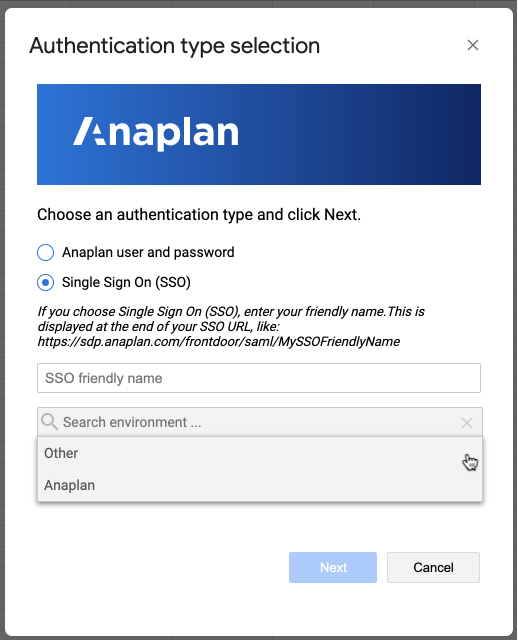
- Click Next.
The Authorize App dialog displays. - Click the checkmark to authorize the app.
You're signed in to the Add-on.
To sign in using SSO when you've signed in before:
- In Google Sheets, go to Add-ons > Anaplan Google Sheets Add-on, and click Show sidebar.
The Anaplan sidebar displays. - Click Sign in at the bottom of the sidebar.
The Single Sign-on dialog displays. - Select Click to allow access with my Identity Provider.
You're signed in to the Add-on.
To sign into a different tenant hosted on Anaplan DC select Settings > Reset authentication type. Next, reconfigure your authentication type.
0
Categories
- All Categories
- 2.3K Anaplan Community
- Academy
- Anaplan Talent Builder
- Model Design Course
- The Anaplan Way
- Archive
- 2 Idea exchange
- 62 Enterprise Scale
- 1.1K Extensibility
- 21 Intelligence
- 1.6K Planning & Modeling
- 331 Security
- Community Connections
- Connections
- Experiences
- Groups
- Personas
- Employees
- CS Toolkit
- Customer Care Center
- Forums
- Academy & Training
- Community Feedback & Updates
- Japan
- Anaplan Community Japan
- Anaplan Community Japan Knowledge Base
- HyperCare Japan
- JP-Central
- Support-Japanese
- Partners
- Partner Leadership Council
- Partner Product Council
- 724 Platform
- Anapedia
- App Hub
- Centers Of Excellence
- Extensions
- Planual
- Platform Updates
- 724 User Experience
- Profile Builder
- Resources
- Anaplan Advocates
- Anaplan Live!
- Community
- Community Advancement
- Community Connections
- Partner Program
- The Official Master Anaplanner Program
- Videos
- Welcome to the Anaplan Community!
- Success Central
- Support
- Case Portal Link
- Common Support Questions
- HyperCare Redirect
- Known Issues and Workarounds
- Support test page
- SupportFAQ
- Survey
- 2 Training Day Takeaways